NexaRide Passenger App
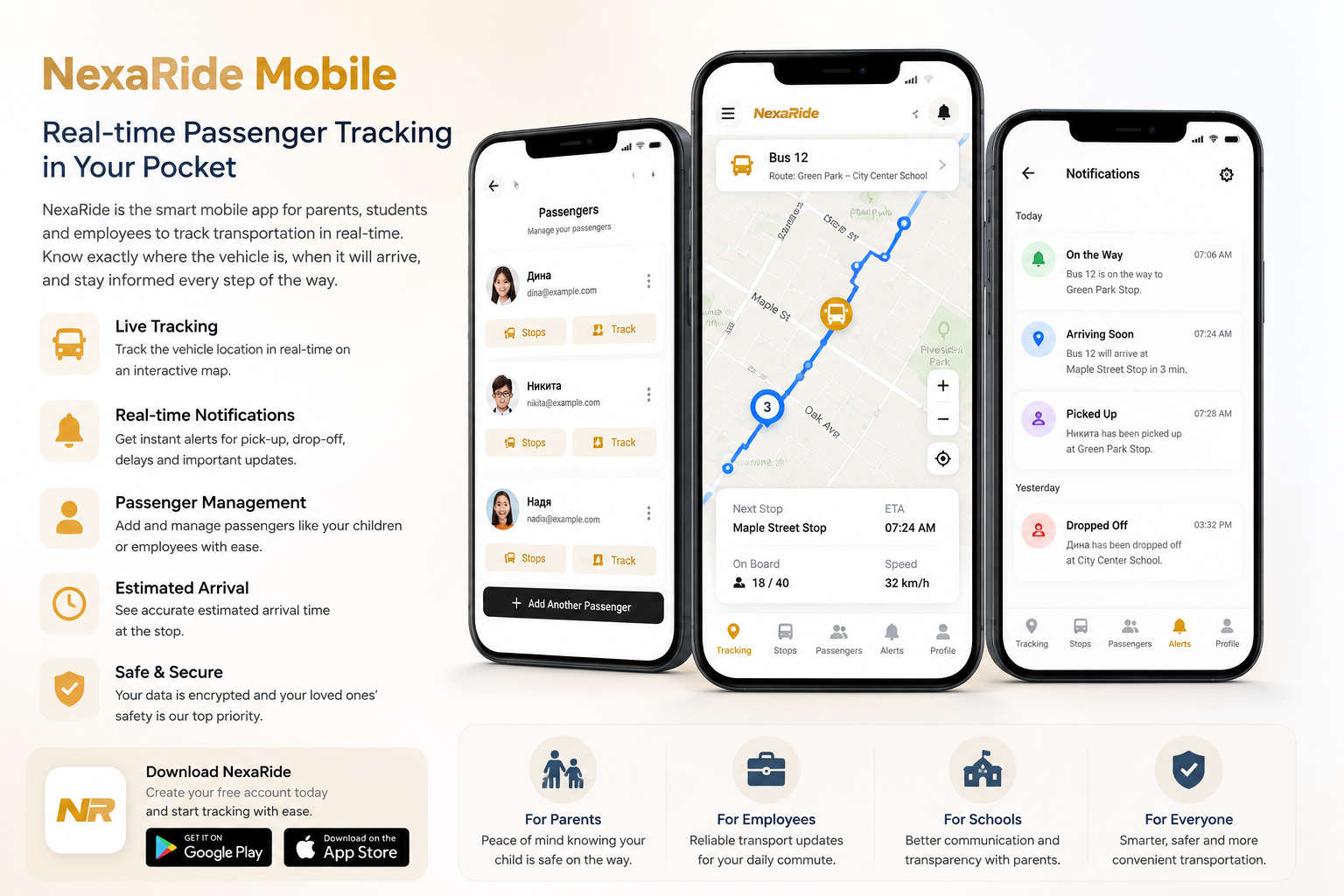
Overview
NexaRide is the mobile companion app for NexaBus. It gives anyone using a managed transportation service real-time visibility into their trips — from live vehicle tracking on a map to instant push notifications when the bus arrives at a stop. A user can add themselves, a family member, a colleague, or anyone else as a passenger and track their transportation from a single account. Designed around the way routes and shifts actually work, NexaRide shows exactly what's happening right now and what's coming up next.
Key Features
Real-Time Vehicle Tracking
Track vehicles live on a map as they travel their routes:
- Vehicle marker updates automatically via a live WebSocket connection
- Map pans to follow the vehicle as it moves
- Numbered stop markers show each passenger's assigned stops in route order
- A route polyline connects stops using actual road directions
- Connection status is shown live (Connecting / Connected / Error)
Tracking is launched directly from a passenger's route card. During an active shift, the Track button opens the live map instantly. Outside shift hours, the button shows a countdown timer (e.g. 01:45:22) until the shift begins.
Stop Assignment
Users assign specific pickup and drop-off stops to each passenger using an interactive map:
- Full-screen map showing all available stops as numbered markers
- Tap any stop to assign or remove it for the selected route
- GPS location button finds nearby routes and suggests them automatically
- Route selector lets you switch between different routes for the same passenger
- Timeline view shows the full stop sequence for a route at a glance
Stops are assigned per passenger per route — changes take effect immediately.
Multi-Passenger Management
Track multiple passengers from a single account — yourself, a family member, a friend, or a colleague:
- Add passengers by passenger code (auto-links to their route) or manually by name and email
- Each passenger card shows assigned routes, shift hours, stops, and tracking controls
- Passengers receive a verification email; tracking and stop assignment unlock once verified
- Per-passenger toggle for stop-arrival email notifications
BLE Beacon Assignment
If your organization uses Bluetooth beacon attendance, you can register a beacon to each passenger directly in the app:
- Scan nearby beacons using the app on a physical device
- Or enter a beacon ID manually (Eddystone and iBeacon formats supported)
- The passenger card shows a blue beacon icon once a beacon is registered
Multi-Organization Support
Connect to multiple transportation providers from one account:
- Enter the organization code provided by each school or company
- Switch between organizations from the app header
- Passengers, routes, and stops are managed separately per organization
Push Notifications
Stay informed with real-time alerts:
- Trip Started — vehicle begins its route
- Stop Arrival — vehicle arrives at your passenger's assigned stop
- Trip Completed — journey has ended
- Route Changes — schedule or route updates from your organization
Individual notification types can be toggled on or off. Each passenger can also receive stop-arrival notifications by email.
AI Assistant
Get instant answers about routes, arrival times, or any transportation-related questions through the built-in AI assistant.
Authentication
Sign in with:
- Email & Password — standard account registration
- Google Sign-In — one-tap authentication with your Google account
Use Cases
Daily Commuters
An employee who travels to work on a company shuttle adds themselves as a passenger, picks their stop, and tracks the bus each morning. No need for someone else to manage their profile — they do it themselves.
School Transportation
A parent adds their child as a passenger, assigns the nearest home stop for pickup and the school stop for drop-off, and receives a push notification and email the moment the bus arrives.
Friends and Family
A user can add a friend or family member as a passenger and track their transportation just as easily — useful for shared rides, university shuttles, or any situation where someone wants visibility on behalf of another person.
Any Route-Based Passenger Service
NexaRide works with any passenger transportation service managed through NexaBus — employee shuttles, school buses, university transport, and more.
Benefits
- Real-Time Visibility: See the vehicle's exact location at any moment
- Shift-Aware Tracking: Countdown timers show when the next shift starts — no guessing
- Precise Stop Control: Each user chooses their own pickup and drop-off stops on a map
- Instant Alerts: Push notifications and emails on every boarding and arrival event
- Multiple Passengers: Track yourself, family members, friends, or colleagues — all from one account
- BLE Beacon Ready: Integrated beacon assignment for organizations using beacon attendance
Getting Started
- Download NexaRide — available on iOS and Android
- Create your account — register with email or Google
- Connect to your organization — enter the code provided by your transportation coordinator
- Add passengers — by passenger code or manually with name and email
- Assign stops — tap the Stops button on each passenger card to select pickup and drop-off stops on the map
- Enable notifications — turn on push alerts in Settings → Notifications
- Start tracking — tap Track on any active route to open the live map